The gap between a product that looks like it was designed and one that was actually designed is visible in seconds — and that gap is almost entirely determined by the quality of the UI kit or template the team started with. A well-constructed Figma UI kit doesn’t just save time: it encodes hundreds of considered design decisions about spacing, color relationships, component states, and interaction patterns that would take weeks of iteration to arrive at independently.
In this guide we’ve curated 36 of the best UI kits, Figma templates, dashboard designs, and stream overlay packages for instant download — covering mobile app UI kits for health and fitness, comprehensive dashboard systems for sales, trading, finance, and operations, website and landing page templates for e-commerce and SaaS, and a complete section of Twitch stream overlay packages for content creators.
What’s in this guide
UI Kits vs. Templates vs. Design Systems: Understanding What You’re Getting
The terms UI kit, Figma template, and design system are often used interchangeably but describe meaningfully different resources. Understanding the difference helps you choose the right product for your specific need.
A UI kit is a library of pre-designed interface components — buttons, form fields, cards, navigation elements, modals — organized in Figma with consistent styling. You use UI kit components to build screens from scratch, assembling them like building blocks. UI kits are most useful when you need design consistency across a new product without starting from a blank component library.
A Figma template goes further than a component library — it provides complete, designed screens showing how those components combine into real interface layouts. The templates in this guide include anywhere from 1 hero section to 110+ complete screens, each representing a finished, production-quality interface design that you customize rather than build.
A design system is the most comprehensive resource — it includes components, templates, design tokens (colors, typography, spacing), usage documentation, and the logic connecting all elements. Most of the resources in this guide are UI kits and templates rather than full design systems, which makes them faster to adopt and easier to work with for most project types.
What “Figma-based” means practically. All templates in this guide that specify Figma format open directly in Figma (the free browser-based version or Figma Desktop). You duplicate the file to your own account, and the well-organized layer structure means you can find and edit any element quickly. Most kits also include Auto Layout components that respond correctly when you change content length — a significant quality indicator.
Mobile App UI Kits
Mobile app UI design is one of the highest-demand skills in the digital product market — and the gap between an app that feels polished and professional and one that feels like a prototype is almost always in the detail of the UI kit it was built from. These mobile app kits cover the most active sectors of consumer app design: healthcare and appointment booking, fitness and activity tracking, and HR management. Each provides complete screen coverage across the key user flows rather than just a selection of highlight screens.
Health – Doctor Appointment Mobile App

Healthcare mobile apps represent one of the fastest-growing segments of the app market, and the specific flow of doctor appointment booking — search, filter, profile review, time selection, confirmation, and reminder — requires careful UX consideration that this template has already done. The blend of functionality and elegance that the Health app delivers addresses the specific tension in healthcare UI: it needs to feel trustworthy and clinical while also being approachable and easy to navigate for patients who may be stressed or unwell when using it.
- Complete doctor appointment booking flow — search through confirmation
- Functional and elegant design balanced for healthcare context
- Trust-building UI appropriate for sensitive health data
- Figma-based with organized components for developer handoff
- Covers all key healthcare app screens: profiles, scheduling, history, and more
Best for: designers and developers building healthcare apps, startups in the healthtech space, and anyone prototyping a telemedicine or appointment booking product.
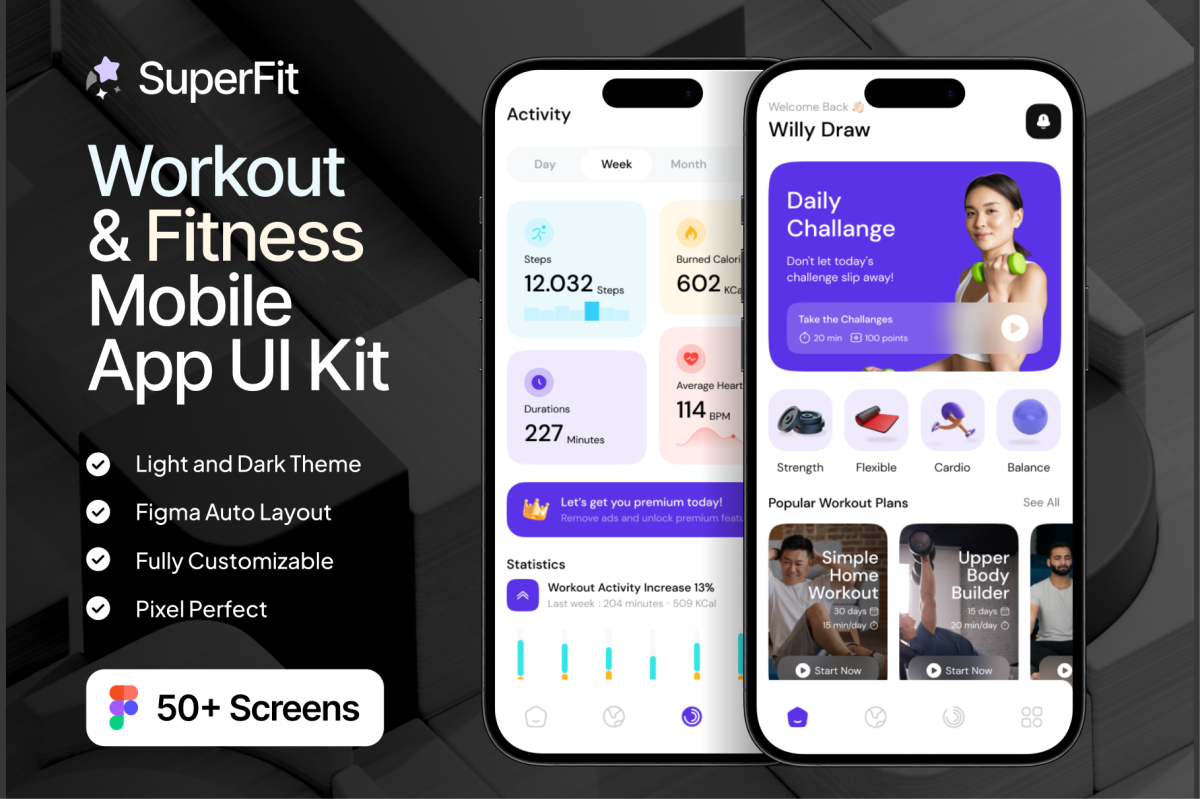
SuperFit – Workout & Fitness Mobile App

Fitness apps have specific design requirements that generic mobile UI kits don’t address: progress visualization needs to feel motivating rather than clinical, workout tracking interfaces need to work during physical activity (large touch targets, minimal cognitive load), and the overall aesthetic needs to communicate energy and achievement. SuperFit’s 50+ screens cover the complete fitness app experience with these requirements built in — from onboarding and goal setting through workout tracking, progress dashboards, and social features.
- 50+ screens covering the complete fitness app user journey
- Motivating visual design — progress and achievement at the core
- Large touch targets and low cognitive load for in-workout use
- Dark and light mode variants for different user preferences
- Figma-based with organized structure for developer handoff
Best for: app designers building fitness and workout products, healthtech startups, and developers who need a complete fitness app UI for prototyping or production.
GoDoc – Health Care App Mobile UI KIT

GoDoc approaches healthcare app design from a mobile-first perspective, with 40+ screens covering the complete patient-facing healthcare experience. Unlike the web-focused health templates in this collection, GoDoc is optimized for the specific constraints of mobile health app design: limited screen real estate, one-handed use patterns, and the anxiety-reducing clarity that patients need when navigating health services digitally. Dark and light mode variants ensure appropriate use across different contexts and accessibility needs.
- 40+ screens covering complete mobile healthcare app experience
- Mobile-first design — optimized for one-handed use and small screens
- Dark Mode and Light Mode for different contexts and accessibility needs
- Anxiety-reducing clarity appropriate for patient-facing health apps
- Figma-based for straightforward developer handoff
Best for: healthtech startups building patient-facing mobile apps, telemedicine platform designers, and developers creating mobile healthcare tools for consumer health markets.
Athora – Fitness Tracker App Design

Outdoor sports and activity tracking apps have specific design requirements: data needs to feel motivating during and after activity, the visual hierarchy must prioritize key metrics (speed, distance, time, heart rate) over secondary information, and the overall aesthetic needs to communicate the premium quality of a serious athletic tool. Athora’s vibrant, modular design achieves all of this — it’s designed for athletes who take their training data seriously, rather than casual fitness app users.
- Vibrant premium design specifically for outdoor sports and activity tracking
- Modular structure highlights progress, speed, and achievement metrics clearly
- Prioritizes key athletic metrics with appropriate visual hierarchy
- Figma-based with clear component organization
- Premium aesthetic communicates serious athletic tool positioning
Best for: designers building outdoor sports and fitness tracking apps, healthtech startups targeting serious athletes, and developers prototyping activity tracking interfaces.
Hia – HR Management App UI KIT

HR management apps handle some of the most sensitive and complex data in any organization — employee records, payroll, leave management, performance reviews, and recruitment pipelines. A UI kit that covers 40+ screens across all these functions in both dark and light mode gives HR software designers a complete reference system rather than having to design every state from scratch. The Figma foundation means the kit integrates seamlessly into modern design-to-development workflows.
- 40+ screens covering the full HR management feature set
- Dark Mode and Light Mode variants for flexible implementation
- Covers employee records, leave management, recruitment, and more
- Well-organized Figma layers for efficient customization and handoff
- Professional quality appropriate for enterprise HR software contexts
Best for: designers building HR software products, SaaS startups in the HR space, and design teams who need a comprehensive HR app reference for rapid feature design.
Dashboard UI Kits
Dashboards are among the most technically demanding UI design challenges — they need to make large amounts of complex data immediately comprehensible, support different user roles and permission levels, work across screen sizes, and remain navigable during extended daily use. These dashboard kits cover the full range of business intelligence and operational management contexts, from sales and trading to school administration and food service operations. Each provides the comprehensive screen coverage that real dashboard products require.
Taskboard – Task Dashboard UI UX KIT

Task management dashboards are among the most complex and most in-demand UI projects in the market — organizations of every size need them, and the range of states, interactions, and data visualization requirements makes designing one from scratch a genuinely laborious undertaking. Taskboard delivers 110+ screens in a fully organized Figma file with both dark and light mode variants, giving developers and designers a complete, production-ready starting point that would take weeks to build from zero. The well-organized layer structure means customization is straightforward rather than a frustrating archaeological dig through someone else’s file.
- 110+ screens covering every task management interface state
- Dark Mode and Light Mode variants included
- Figma-based with well-organized layer structure — easy to customize
- Tablet and mobile responsive screens available
- Production-ready quality — developer handoff ready
Best for: UI/UX designers building task management products, developers who need a complete Figma handoff for a productivity app, and startups prototyping task dashboard features quickly.
SaleBoard – Sale Dashboard UI UX KIT

Sales dashboards are mission-critical business tools — sales teams check them multiple times daily, and the quality of the data presentation directly affects decision-making speed and accuracy. SaleBoard’s 80+ screens cover the complete sales intelligence interface: pipeline views, individual rep performance, regional breakdowns, forecast modeling, and conversion funnel analysis. The responsive design across tablet and iPad means field sales teams using mobile devices get the same data quality as office-based managers.
- 80+ screens covering the complete sales intelligence dashboard feature set
- Responsive design: desktop, tablet, and iPad screens included
- Covers pipeline, performance, forecasting, and conversion analysis
- Dark and light mode variants for different work environments
- Production-ready Figma quality for developer handoff
Best for: designers building sales intelligence tools, CRM software companies, and startups developing sales performance dashboards for enterprise clients.
PopTrade – Trading Dashboard UI KIT

Trading dashboard design is one of the most technically demanding UI challenges — the interface needs to display enormous amounts of real-time data (price charts, order books, portfolio positions, market news) in a way that experienced traders can navigate in milliseconds. PopTrade’s 90+ screens represent a comprehensive reference for this complexity, covering every major trading interface pattern with the dark mode aesthetic that traders prefer for long sessions in front of screens.
- 90+ screens — the most comprehensive trading dashboard kit in this collection
- Dark mode primary design — standard for professional trading environments
- Covers charts, order books, portfolio management, and market data
- Figma-based with organized components for systematic customization
- Production-quality reference for fintech development teams
Best for: fintech designers and developers, crypto exchange startups, trading platform companies, and anyone building financial data dashboards who needs a comprehensive design reference.
Task & Project Management Dashboard

Project management dashboards need to give team leaders and individual contributors different views of the same data — Taskie addresses this with a simple modern design that prioritizes clarity over complexity. The soft yet bright color combination creates a workspace aesthetic that’s pleasant for extended daily use without the sterile quality of purely functional enterprise software. The template covers team task overview, individual assignment views, project timeline, and progress reporting.
- Soft bright color combination — pleasant for extended daily use
- Covers team and individual task views in a unified design system
- Figma template for easy developer handoff and customization
- Simple modern aesthetic that doesn’t overwhelm with visual complexity
- Suitable for both startup product development and internal tool design
Best for: designers building project and task management tools, startups developing productivity software, and teams who need an internal task management tool with a polished UI.
Dompet – Payment Admin Dashboard UI

Payment and wallet administration dashboards handle transaction history, balance management, invoice generation, and financial reporting in a single interface. Dompet is specifically designed for this context — modern dashboard UI with the specific data types and visualization needs of digital payment administration. The template covers wallets, digital money, digital payments, invoices, and transaction histories in a cohesive visual system that makes dense financial data accessible and actionable.
- Specifically designed for payment and wallet administration interfaces
- Covers wallets, digital payments, invoices, and transaction history
- Modern UI design with appropriate financial data visualization
- Clean layout makes dense financial data accessible and actionable
- Figma-based for straightforward developer handoff
Best for: fintech designers building payment administration tools, digital wallet startups, and developers creating payment management dashboards for financial applications.
Jobie Admin – Portal Dashboard UI Design

Job portal and hiring platform dashboards serve multiple user types simultaneously — recruiters managing pipelines, candidates tracking applications, and administrators overseeing the platform — each needing a different view of the same underlying data. Jobie’s modern dashboard design handles this complexity with a clean, organized interface that works equally well for job portals, hiring apps, freelancer platforms, and career services. The versatility makes it an excellent starting point for any talent acquisition or employment platform.
- Designed for job portals, hiring apps, freelancer platforms, and career apps
- Multi-user role design — recruiter, candidate, and admin views considered
- Modern clean UI appropriate for professional employment contexts
- Figma-based with organized layer structure
- Versatile foundation adaptable to different talent acquisition platform types
Best for: designers building recruitment and hiring software, job board startups, freelancer platform developers, and anyone creating career or employment-focused web applications.
Nutrigo – Nutrition & Diet Dashboard

Nutrition and diet management dashboards need to balance comprehensive data (calorie tracking, macro ratios, meal planning, progress visualization) with an aesthetic that feels energizing and positive rather than clinical or punishing. Nutrigo achieves this with a bright, energetic color combination that makes the daily practice of nutrition tracking feel motivating. The dashboard format covers both the management view (for nutritionists and coaches) and the user view (for individuals tracking their own nutrition).
- Bright, energetic design — makes nutrition tracking feel motivating not clinical
- Covers both coach/management and individual user dashboard views
- Comprehensive data visualization: macros, calories, progress, and meal planning
- Figma-based with organized components for customization
- Color combination reinforces healthy lifestyle brand positioning
Best for: designers building nutrition and diet applications, health coaching platforms, and startups developing personalized nutrition tools for consumers or healthcare providers.
Ar. Finance Dashboard Figma Design

Financial dashboards need to make complex data immediately comprehensible — the difference between a good financial UI and a great one is entirely in how well it answers the user’s most important questions before they have to ask them. The Ar. Finance Dashboard focuses on insightful analysis and streamlined financial data, with the clear information hierarchy that makes financial decision-making faster and more confident. Designed for financial management capabilities across business finance contexts.
- Insightful analysis focus — answers key financial questions proactively
- Clear information hierarchy makes complex data immediately comprehensible
- Comprehensive financial data visualization across key metrics
- Figma-based for clean developer handoff
- Suitable for business finance, accounting, and financial management platforms
Best for: fintech designers, financial software developers, accounting software startups, and anyone building tools for business financial management and analysis.
SchoolHub – School Management Dashboard

School management systems handle an extraordinary breadth of administrative functions — student enrollment, attendance tracking, grade management, teacher schedules, parent communication, and financial administration. SchoolHub is specifically designed for this complexity, with a clean and modern aesthetic that makes dense administrative data navigable rather than overwhelming. The complete scope of the template means it serves as both a design reference and a working prototype for anyone developing school administration software.
- Complete school administration dashboard covering all key management functions
- Clean modern design makes complex administrative data navigable
- Covers student records, attendance, grades, scheduling, and communications
- Figma-based for design and developer workflow integration
- Suitable for both primary and secondary educational institution contexts
Best for: EdTech developers and designers, school software startups, and anyone building or redesigning school administration software who needs a comprehensive design reference.
Inventory Management Admin Dashboard

Inventory management dashboards serve warehouse managers, procurement teams, and operations administrators who need real-time visibility into stock levels, movement, and forecasting. Ventorie delivers this with a clean, modern design where eye-catching charts make the key inventory metrics immediately scannable rather than requiring users to dig through tables. The admin dashboard format covers product listings, stock levels, movement history, supplier management, and reporting in a cohesive visual system.
- Eye-catching charts make key inventory metrics immediately scannable
- Covers products, stock levels, movement, suppliers, and reporting
- Clean modern design appropriate for professional operations contexts
- Figma-based with organized components for customization
- Suitable for retail, e-commerce, and warehouse management contexts
Best for: operations software designers, e-commerce platform developers, warehouse management system teams, and anyone building inventory tracking tools for product businesses.
Dpopfood – Food and Beverage Dashboard U

Food and beverage businesses — restaurants, food delivery platforms, catering operations — have specific dashboard needs: order management, menu analytics, revenue by item, delivery performance, and customer satisfaction tracking. Dpopfood covers 35+ screens in a responsive design that works across desktop and tablet, making it suitable for both kitchen-side tablet use and office-based management review. The marketing focus means the template also covers promotional campaign tracking and customer behavior analytics.
- 35+ screens covering food and beverage operations and marketing analytics
- Responsive design: desktop and tablet screens included
- Covers orders, menu analytics, revenue, delivery, and customer satisfaction
- Marketing analytics focus alongside operational management
- Figma-based for straightforward customization and handoff
Best for: food delivery platform designers, restaurant management software developers, catering operations tools teams, and anyone building digital management tools for the food and beverage industry.
Website & Landing Page Templates
Website and landing page templates in Figma serve a different purpose from traditional web templates — they’re design files for customization and development rather than theme installations. If you want options built specifically to turn visitors into customers, see our roundup of landing page templates that actually convert, and for industry-specific builds explore these HTML website templates. This means the design quality is under your full control, and the templates serve equally well as client presentation materials, developer handoff files, and production design foundations. This section covers e-commerce, photography portfolios, real estate, SaaS products, and travel.
7 Ecommerce Website Figma Templates

Seven homepage designs plus forty inner pages in a single purchase represents exceptional scope for e-commerce design work — it means you have a homepage for every major e-commerce aesthetic direction, plus the complete inner page set needed to build a full store. The WooCommerce compatibility is particularly valuable for designers working in the WordPress ecosystem, where WooCommerce powers the majority of online stores. Having 7 homepage options means you can present multiple directions to a client from a single template purchase.
- 7 homepage designs PLUS 40 inner pages — complete e-commerce design system
- WooCommerce-compatible layouts — ideal for WordPress ecosystem designers
- Multiple aesthetic directions in one purchase for client presentations
- Covers product pages, category pages, cart, checkout, and all key e-commerce screens
- Figma format with organized components for efficient customization
Best for: web designers who build e-commerce sites for clients, freelancers who want to present multiple homepage directions, and developers building WooCommerce stores who need a polished design foundation.
Shopify Ecommerce Website Template

A PSD and XD template specifically designed for Shopify addresses the design challenge that most Shopify merchants face: the default themes are recognizable and limiting, but building a custom design from scratch is expensive. This template provides a complete, professionally designed Shopify website — homepage, product pages, collection pages, cart, and checkout — in editable formats that can be handed off to a developer for implementation. The UX patterns are specifically optimized for conversion rather than just aesthetics.
- PSD and XD formats — works with Adobe Photoshop and Adobe XD
- Complete Shopify site: homepage through checkout
- Conversion-optimized UX patterns built into the design
- Professional quality appropriate for serious e-commerce operations
- Instant download — start customizing and developing immediately
Best for: Shopify merchants who want a custom design, web designers building Shopify sites for clients, and developers who need a complete design file for Shopify implementation.
Jewelry E-Commerce Website UI Figma

Jewelry e-commerce has specific design requirements that generic e-commerce templates don’t meet: the products need to be shown at their best (large, high-quality imagery, minimal competing visual elements), the aesthetic needs to communicate luxury and precision craftsmanship, and the overall impression needs to justify premium pricing. Axels addresses all of these with a simple elegance approach — the template’s restraint is deliberate, ensuring jewelry products are always the visual star of every page.
- Simple elegance aesthetic — jewelry always remains the visual focus
- Designed specifically for jewelry and luxury product e-commerce
- Figma-based with clean component structure for customization
- Covers product pages, collection views, and key conversion flows
- Premium visual quality that justifies jewelry pricing
Best for: jewelry brands building their online store, luxury and premium product e-commerce designers, and developers building high-end product websites who need a refined design foundation.
Pet E-commerce Website Figma Design

Pet e-commerce is a consistently growing market with specific design requirements: the products need to be shown in context (pets using them, not just product shots), the brand tone needs to be warm and personality-driven rather than clinical, and the purchase journey needs to account for emotional rather than purely rational decision-making. This Figma template delivers specialized web page layouts specifically designed for the pet product market, with the visual warmth and personality that pet product brands require.
- Specialized layouts for the specific requirements of pet product e-commerce
- Warm, personality-driven design tone appropriate for pet brand positioning
- Context-focused product presentation — shows products with pets in use
- Figma format with organized page layouts for customization
- Covers the key pages needed for a complete pet e-commerce store
Best for: pet product brand designers, pet e-commerce developers, agencies building stores for pet industry clients, and anyone launching a direct-to-consumer pet product brand online.
Blake – Photography Landing Page Figma

A photographer’s website has one primary job: making the work look as good as possible while communicating the photographer’s specific aesthetic and making it easy for potential clients to get in touch. Blake achieves this through a clean black-and-white design that puts the photography front and center without competing visual elements. The restraint of a monochrome palette is actually the right choice for photography portfolios — it ensures the images remain the visual focus rather than fighting with the template’s own color scheme.
- Clean black and white design — photography always remains the visual focus
- Figma template for easy customization to your specific work and brand
- Minimalist layout communicates professional sophistication
- Designed specifically for photography portfolio and landing page use
- Instant download — customize and deploy quickly
Best for: photographers building or redesigning their portfolio website, web designers creating sites for photographer clients, and anyone in visual creative industries who needs a clean, work-focused landing page.
Harmony – Real Estate Landing Page

Real estate landing pages for new property developments need to achieve a very specific goal: making a property feel like an aspirational lifestyle choice rather than just a housing transaction. Harmony delivers this through an editorial-style design with modern minimalism — the kind of visual language associated with high-end property publications rather than generic real estate portals. The UI kit is specifically designed for showcasing new developments, with the property imagery and lifestyle positioning at the center of the design.
- Editorial style with modern minimalism — premium property positioning
- Specifically designed for new property development marketing
- Lifestyle-focused design rather than transaction-focused real estate portals
- Figma UI kit with organized components for customization
- Converts property interest into genuine aspiration and inquiry
Best for: real estate developers marketing new properties, property marketing agencies, and designers building landing pages for luxury and premium real estate clients.
Quad SASS Software and AI Design Figma

SaaS and AI product landing pages have a specific challenge: communicating complex technical capabilities to non-technical decision-makers in a way that’s compelling and clear. Quad provides predefined web elements specifically calibrated for this context — business consulting and SaaS positioning that speaks to enterprise buyers. The AI design angle is particularly relevant as AI-powered software products increasingly need landing pages that communicate both technical credibility and business value simultaneously.
- Predefined web elements optimized for SaaS and AI product positioning
- Business consulting and enterprise buyer communication built into the design
- Figma-based with customizable elements for quick adaptation
- Covers hero, features, pricing, and conversion-focused sections
- Designed for the specific challenge of communicating technical products clearly
Best for: SaaS companies building or redesigning their landing pages, AI product startups, and designers who create websites for technical software clients.
Crypto Exchange Website Ui Figma Design

Crypto exchange interfaces face a unique design challenge: they need to serve both beginner users who need simplicity and guidance, and experienced traders who need comprehensive data access and fast execution. This Figma template provides predefined web elements calibrated for the crypto exchange context — asset listings, market data, trading interfaces, portfolio views, and account management — with a design language appropriate for the trust and credibility requirements of financial exchange platforms.
- Predefined elements calibrated for crypto exchange platform requirements
- Serves both beginner and experienced trader user needs
- Covers asset listings, market data, trading, portfolio, and account screens
- Figma format for straightforward customization and development
- Trust and credibility-appropriate design for financial exchange context
Best for: crypto exchange startups, DeFi platform designers, fintech developers building digital asset trading interfaces, and anyone designing cryptocurrency financial products.
WanderNow – Travel Hero Section

The hero section is the most critical part of any travel website — it’s where the emotional decision to explore further is made or lost. WanderNow delivers a single, highly polished hero section template specifically designed for travel agency websites, with the contemporary visual language that modern travel brands use to inspire wanderlust. As a focused single-screen template, it’s ideal for designers who need a high-quality starting point for the most important section of a travel site without purchasing an entire template system.
- Focused on the most important section of any travel website — the hero
- Contemporary travel brand visual language that genuinely inspires wanderlust
- Figma template with easy editing for quick customization
- 1 screen delivered with full support documentation
- Ideal starting point for travel agency website design projects
Best for: travel website designers, travel agency digital marketers, and anyone building a travel-focused website who wants a high-quality, modern hero section as a starting point.
30+ Figma Home Pages

A collection of 30+ homepage designs covering SaaS landing, app landing, HR management, CRM software, and startup contexts represents exceptional versatility for a single purchase. Rather than designing every homepage from a blank canvas, a designer with this template can rapidly prototype and present multiple directions — SaaS homepage option A, startup homepage option B — from a single professionally-designed reference library. The Sasskly template’s modern, clean aesthetic is appropriate for virtually every B2B digital product category.
- 30+ homepage designs covering SaaS, app, HR, CRM, and startup contexts
- Rapid prototyping value — present multiple directions from one purchase
- Modern, clean aesthetic appropriate for B2B digital products
- Figma format with organized components for efficient customization
- Covers the most common digital product homepage design scenarios
Best for: product designers and design agencies who work across multiple SaaS clients, startup founders prototyping their landing page quickly, and designers who need a comprehensive homepage reference library.
Multi-Purpose & Mega Bundles
Multi-purpose UI bundles and community platform kits serve designers who work across varied project types — rather than a single focused application, these resources cover multiple design contexts in one purchase. Designers assembling a broader product stack often pair these bundles with our roundup of digital templates for creators and businesses. They’re particularly valuable for freelancers and agencies who need design starting points for diverse client work.
Mega UI Website Template Bundle

A mega UI template bundle covering multiple design concepts — workout progress, fitness tracking, and general landing page design — gives designers and developers a library of starting points rather than a single design direction. The sensor-based fitness technology focus reflects current market demand for wearable and IoT-connected fitness products, making this bundle particularly relevant for health and fitness tech product teams. The variety within the bundle means it covers different aspects of fitness app design in one purchase.
- Multiple UI design concepts in one bundle — exceptional range of starting points
- Fitness and workout tracking focus with sensor-based technology consideration
- Covers landing pages, app interfaces, and progress tracking designs
- Landing Page Design Concept quality throughout the collection
- Instant download — a complete fitness UI design reference library
Best for: fitness tech product designers, health startup teams who need multiple design direction options, and developers building fitness or wellness platforms who want comprehensive design coverage.
Community Managment Web App Ui Kit

Community and chat management platforms have become essential infrastructure for online businesses, creator communities, and brand ecosystems. The Community Management UI Kit provides a modern, elegant design for the complete community platform experience — chat interfaces, member management, content moderation, analytics, and community discovery. The ready-to-develop approach means the kit is built with implementation in mind, not just visual design.
- Complete community and chat management interface design system
- Modern elegant design concept appropriate for professional community platforms
- Ready-to-develop — built with implementation practicality in mind
- Covers chat, member management, moderation, and analytics screens
- Easy to re-edit Figma format for rapid customization
Best for: startups building community platforms, creators launching paid community tools, and designers working on social or community-focused web applications.
Twitch Stream Overlay Packages
Stream overlays are the visual identity of a Twitch channel — they define how professional and distinctive your channel looks to every viewer. This section covers the full spectrum of streaming aesthetics: from versatile black-and-white packages to animated character-themed overlays to ethereal celestial designs. Whether you’re a gaming streamer who needs a clean professional package or a creative streamer building a specific aesthetic identity, there’s a complete package here.
Twitch Stream Overlays Package

Stream overlays define the visual identity of a Twitch channel — they’re the first thing viewers see and the consistent visual frame around every stream. A complete stream package covering starting screen, ending screen, Be Right Back, offline screen, and Twitch panels gives a streamer everything needed for a cohesive, professional channel identity in one download. The black and white color scheme is a deliberate aesthetic choice that works with virtually any game or content type rather than clashing with specific title palettes.
- Complete stream package: Starting, Ending, BRB, Offline, and Twitch Panels
- Black and white scheme works with any game or content type
- Multiple file formats: AI, EPS, JPG, SVG — maximum flexibility
- Source files included for full customization in Adobe Illustrator
- Professional, cohesive channel identity in a single download
Best for: Twitch streamers building a professional channel identity, content creators on streaming platforms, and graphic designers creating stream packages for clients.
Twitch Overlay Live Stream Set

A complete stream overlay set — Starting, Ending, BRB, Offline, Intermission, and Twitch Panels — provides everything a streaming channel needs for professional, cohesive visual branding in a single download. The multiple file format provision (AI, EPS, JPG, SVG, plus source files) gives maximum flexibility: use the SVG for web display, the AI source for customization in Illustrator, and the JPG for platform uploads that don’t support vector. Having source files means the design is truly yours to customize.
- Complete set: Starting, Ending, BRB, Offline, Intermission, and Twitch Panels
- Multiple formats: AI, EPS, JPG, SVG — plus source files for full customization
- Source files mean the design is truly customizable to your brand
- Professional cohesive visual identity for your streaming channel
- Instant download — professional stream branding today
Best for: Twitch streamers who want a professional and fully customizable channel visual identity, streaming content creators on any platform, and graphic designers creating stream packages for clients.
Strawberry Twitch Stream Package

Animated stream overlays are a significant step above static ones — the motion creates visual interest during loading screens and adds a polished, production-value quality that viewers associate with established, professional channels. The Strawberry package delivers four fully animated screens (Starting, Ending, BRB, Offline) at 1920×1080 in MP4 format, each 9 seconds long. The distinctive strawberry aesthetic creates an immediately recognizable, cute channel identity that stands out in the homogenous landscape of generic gaming overlays.
- 4 fully animated screens in MP4 format — production value upgrade over static overlays
- 1920×1080 resolution — full HD broadcast quality
- Each animation 9 seconds long — smooth, professional loop quality
- Distinctive strawberry aesthetic — recognizable channel identity
- Instant download — set up your animated stream today
Best for: streamers who want animated overlays for a more professional and visually engaging channel, content creators with a cute or kawaii aesthetic brand, and anyone building a distinctive Twitch visual identity.
Cottagecore Twitch Stream Overlay Pack

Cottagecore as a streaming aesthetic represents a specific and enthusiastic community — cozy games, life simulation titles, and creative content creators who want their channel to feel warm, natural, and inviting rather than aggressive or gaming-generic. This pack delivers 6 animated screens in two versions per screen, giving enormous flexibility for different streaming contexts. The cottagecore aesthetic is particularly well-suited to streaming communities built around Stardew Valley, Animal Crossing, and similar titles.
- 6 animated screens with two versions each — extensive flexibility
- Cottagecore aesthetic perfect for cozy gaming and life sim content
- Animated MP4 format at 1920×1080 — professional quality
- Covers Starting, Ending, and BRB screens completely
- Instant download — transform your channel aesthetic immediately
Best for: cozy game streamers, Animal Crossing and Stardew Valley content creators, craft and creative streamers, and anyone whose channel brand is warm, natural, and cottagecore-adjacent.
Delicate Celestial Twitch Stream Package

The celestial aesthetic — stars, moons, cosmic imagery — has become one of the most popular visual identities for creative streamers, particularly those creating art, music, ASMR, and contemplative content. The Delicate Celestial package delivers animated screens with a refined, delicate interpretation of this aesthetic — not the heavy, dark space theme, but a softer, more ethereal approach that works beautifully for channels with a calm, artistic, or spiritual brand. Three animated screens at 1920×1080 cover the core streaming transitions.
- Delicate, ethereal celestial aesthetic — softer than typical space themes
- 3 animated screens at 1920×1080 — high quality streaming transitions
- Covers Starting, Ending, and BRB screens
- Perfect for art, music, ASMR, and contemplative content channels
- Instant download — immediately transform your channel aesthetic
Best for: art streamers, ASMR content creators, music streamers, and anyone whose channel brand is calm, ethereal, or celestial-aesthetic adjacent.
Pink Digital Aesthetic Twitch Package

The pink digital aesthetic — combining soft pink tones with digital and tech-adjacent visual language — has emerged as a distinctive and popular streaming identity for creators who want to subvert the dark, aggressive aesthetic of typical gaming channels. This package delivers 3 animated screens with a 6-second loop each, covering the core streaming transitions. The aesthetic works particularly well for variety streamers, beauty and lifestyle creators who also stream, and anyone whose personal brand centers on a feminine digital identity.
- 3 animated screens with 6-second loops — smooth, professional transitions
- Pink digital aesthetic subverts typical gaming channel visual identity
- Perfect for variety streamers and creators with a feminine digital brand
- 1920×1080 MP4 format — standard broadcast quality
- Instant download — distinctive visual identity from day one
Best for: variety streamers with a feminine or pink aesthetic brand, beauty and lifestyle creators who stream, and anyone building a Twitch channel identity that stands out from conventional gaming aesthetics.
How to Choose the Right UI Kit for Your Project
Match the kit to your design stage. If you’re in early concept and exploration, a template with many screens gives you the most to work from and adapt. If you’re in detailed design of a specific feature, a focused UI kit for that application type (a trading dashboard kit for a fintech feature, a health app kit for a healthcare flow) will have the specific components and patterns you need. Don’t buy a 110-screen dashboard kit if you only need to design one screen — and don’t buy a single hero section template if you need a complete product design.
Check the organization quality before committing. The most important quality indicator in a Figma UI kit isn’t the visual design — it’s the layer organization. A beautifully designed kit with chaotic, unlabeled layers is actually harder to work with than a simpler kit with clean, logical structure. All kits in this guide specify “well-organized layers” as a feature, which is worth verifying in the preview images before purchasing.
Dark mode and light mode are worth the premium. Kits that include both dark and light mode variants are significantly more valuable than single-mode kits because they handle twice the design work. Building dark mode from a light mode design (or vice versa) requires systematic color system adjustments that take significant time — having both included is a real time saver, not just a cosmetic addition.
Responsive variants matter for real products. Several kits in this guide include tablet and mobile-responsive variants alongside desktop designs. For products that will be used across device types — which is most modern products — having responsive variants in the design file means developers have clear reference for every breakpoint rather than having to interpret how the desktop design should adapt.
Stream overlays: animated vs. static. Animated stream packages (marked as MP4 in their specifications) create a significantly more professional impression than static overlays, particularly for the starting and BRB screens where viewers have time to observe the design. If you’re building a channel identity that you want to feel established and premium, animated overlays are worth the additional cost.
Frequently Asked Questions About UI Kits & Figma Templates
What’s the difference between a UI kit and a Figma template?
A UI kit is a library of reusable interface components — buttons, cards, forms, navigation — that you assemble into screens yourself. A Figma template provides complete, pre-designed screens that you customize rather than build from scratch. UI kits give you maximum flexibility; templates give you the fastest path to a finished layout. Many of the products in this guide combine both.
Do I need a paid Figma account to use these UI kits?
No. Every Figma UI kit and template here opens in the free browser-based version of Figma. You duplicate the file to your own account and start editing — no paid plan required for individual designers. A paid plan only becomes useful when you need advanced team collaboration features.
Can I use these UI kits and templates for commercial client work?
Yes. Every UI kit, Figma template, and overlay package in this collection comes with a commercial license through Creative Fabrica, so you can use them in paid client projects, your own products, and monetized channels. Always check the specific license terms shown on each product page for any edge cases.
Are these UI kits good for beginners?
Absolutely. A well-organized UI kit is one of the fastest ways for a beginner to produce professional-looking work, because the spacing, color, and component decisions are already made for you. Start with a template that includes many complete screens so you can learn by customizing real layouts. If you also need polished typography to match, our guide to modern serif fonts for branding pairs well with these kits.
What makes a high-quality Figma UI kit?
The single most important quality indicator is layer organization, not visual polish — clean, logically named layers and Auto Layout components make a kit far easier to work with. Beyond that, look for dark and light mode variants, responsive breakpoints for tablet and mobile, and clearly documented component states.
Do the Twitch stream overlay packages work with OBS and Streamlabs?
Yes. The overlay packages are delivered as standard image and video files (PNG and MP4) that import directly into OBS Studio, Streamlabs, and other broadcasting software as sources and scenes. Animated MP4 elements like starting-soon and BRB screens work the same way as static ones.
Every UI kit, template, and overlay package in this collection is available as an instant digital download from Creative Fabrica. Purchase, download, and open in Figma — your next design project starts with a professional foundation already in place.